What the questionnaire is really for
The final wedding questionnaire is an operational document disguised as an easy client conversation. Its job is not to prove how thorough you are. Its job is to expose the information that changes your arrival time, travel plan, portrait order, lighting preparation, communication, or expectations before those decisions become urgent.
A question earns its place when you can describe what you will do differently because of the answer. A ceremony address affects travel and access. The name of the person helping with family groups affects how quickly people can be gathered. A difficult family relationship changes the group order and the language you use. A generic question such as ‘What photographs do you like?’ may produce a pleasant answer without improving the plan.
I prefer to structure the questionnaire in the same sequence that I mentally walk through a wedding: contacts and locations, morning preparations, ceremony, portraits, reception, people, and final practical notes. That order makes the form easier for a couple to complete and easier for a photographer to review. It also reveals contradictions—for example, when the proposed family photographs overlap with travel to the reception.
When to send the final questionnaire
For most weddings, four to eight weeks before the date is a useful window. Earlier than that, schedules and supplier details may still be provisional. Much later, and there is little room to clarify missing addresses, unrealistic portrait expectations, or a timeline that does not allow for travel.
The exact timing depends on your workflow. If you hold a final planning call, send the questionnaire far enough ahead that you can review it first. The call should resolve exceptions rather than become a live data-entry session. Give a clear completion date and explain why it matters: you are using the answers to prepare their photography plan, not collecting administration for its own sake.
Send one reminder before the deadline and a personal follow-up after it. Repeated automated nudges can make a long form feel like homework. A short message naming the two or three decisions waiting on their answers usually works better.
The questions to include
Use this as a working template, then remove anything that does not affect your service. Keep labels plain, explain why sensitive information is useful, and provide a notes field where the available choices cannot cover every family or tradition.
Contacts, access and locations
- Names, email addresses and mobile numbers for both partners.
- Full preparation, ceremony and reception addresses, including postcodes or ZIP codes.
- Access, parking, permits, security, restricted areas and the best entrance for suppliers.
- A day-of contact who is not one of the partners, plus the planner or venue coordinator where relevant.
- Any location changes since booking and realistic travel time between them.
Morning preparations
- Who will be present at each preparation location?
- What time should everyone be dressed and ready—not merely starting to get dressed?
- Are there details, gifts, letters, first looks or cultural events that need allocated time?
- Are hair and makeup schedules confirmed, and is there contingency time?
Ceremony and reception
- Confirmed ceremony start time, expected duration and restrictions on movement or flash.
- Confetti, receiving line, transport, meal, speeches, cake, first dance and evening-event timings.
- Changes of clothing, room turnarounds, surprise performances or traditions not shown in the venue schedule.
- Who has authority to adjust the running order on the day?
People, family photographs and sensitive context
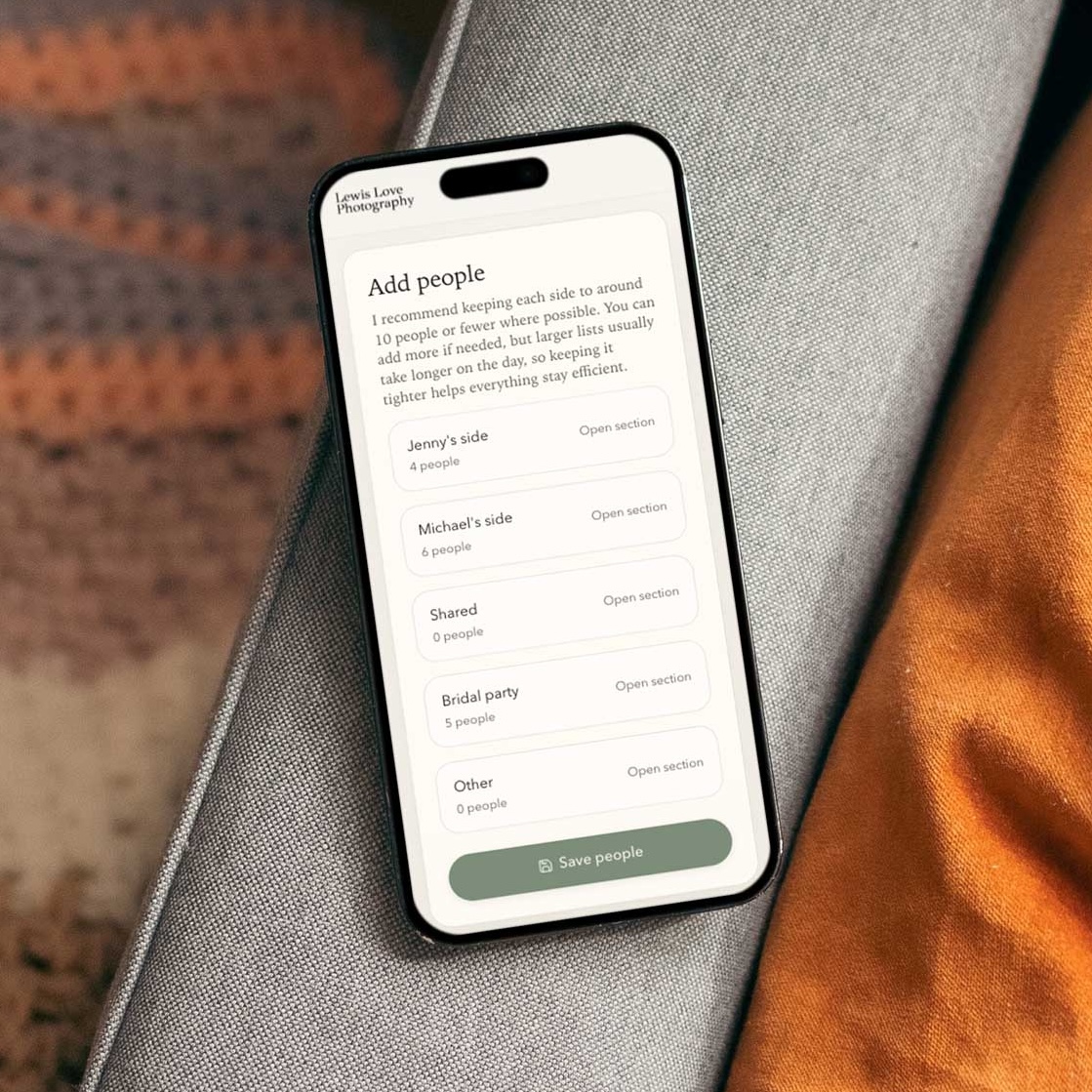
Ask for names and relationships rather than labels such as ‘bride’s family’. Names let you call people confidently and help assistants or second photographers understand the list. Relationships help you spot missing combinations and order groups without repeatedly dismantling and rebuilding the same set of people.
Give couples a calm, optional way to mention bereavements, separation, mobility needs, neurodiversity, conflict, estrangement, or names and pronouns you should use. Do not ask for a family history. Ask for the practical information that helps you avoid distress and organise people respectfully. Explain that the information is used only for planning the wedding photography.
For formal groups, collect the exact people in each requested photograph. Then review the list as a photographer. Couples often include near-duplicates, omit a key parent combination, or create a list that requires far more time than the timeline allows. Your questionnaire should collect their priorities; your professional review turns those priorities into a workable order.
- Name one confident helper from each side who recognises the people involved.
- Ask whether anyone has limited mobility, hearing difficulty, young children, or another reason to photograph their group early.
- Ask which combinations are essential and which are optional if time runs short.
- Confirm whether separated relatives should be photographed together, separately, or not at all.
How to make the questionnaire easier to complete
Completion quality matters more than question count. Break the form into short sections, begin with easy factual questions, and reserve open text for situations where it adds real value. Use conditional questions where possible: someone who is not having confetti should not have to answer three more questions about it.
Avoid asking couples to repeat details already held in your CRM unless the information may have changed. Where you do repeat it, frame the question as confirmation. Provide examples for complex fields. ‘List each family photograph with every person’s name’ is clearer when followed by an example such as ‘Alex, Sam, Priya (Alex’s mum) and David (Alex’s dad)’. Do not display a huge undifferentiated wall of fields.
Test the form on a phone. Most couples will open the link from an email or message and may complete it in several sittings. A private link without another account or password removes one avoidable source of friction. Save progress where your system permits it, and make the final submit state unambiguous.
Turn answers into a photography plan
The questionnaire is not finished when the couple presses submit. Review the answers against the booked coverage, travel time, venue rules, sunset, requested group photographs and your own working pace. Mark contradictions and unanswered decisions. Then convert the useful details into the tools you will actually consult: contact sheet, portrait order, timeline, notes for a second photographer, and wedding-day checklist.
This conversion step is where generic forms often fail. The answers sit in a PDF, CRM tab or email while the photographer manually copies names into a group list and timings into a separate schedule. If you use separate systems, schedule time for that translation and maintain one approved master. If you use MomentCue, the couple’s structured answers can remain attached to the people, groups and timeline you review.
Finally, confirm the plan rather than asking the couple to approve every photographic decision. Send a concise summary of any agreed changes, identify the person helping gather groups, and state when the working version is locked. You remain responsible for adapting on the day, but preparation removes preventable uncertainty.